Search articles

Type a keyword to start searching
Back to selected work
Case 052026

Turning analysis into chart pages

Visualization Agent

A system for turning analysis results into interactive chart pages. The model prepares a chart specification; code checks the data and configuration, then renders it with chart components.

Output image pending
Agent engineering / Data visualization2026
Specify the data and chart first, then let components build the page.
3 gates
structure, meaning, and rendering checks
5 × 100
five categories of regression cases
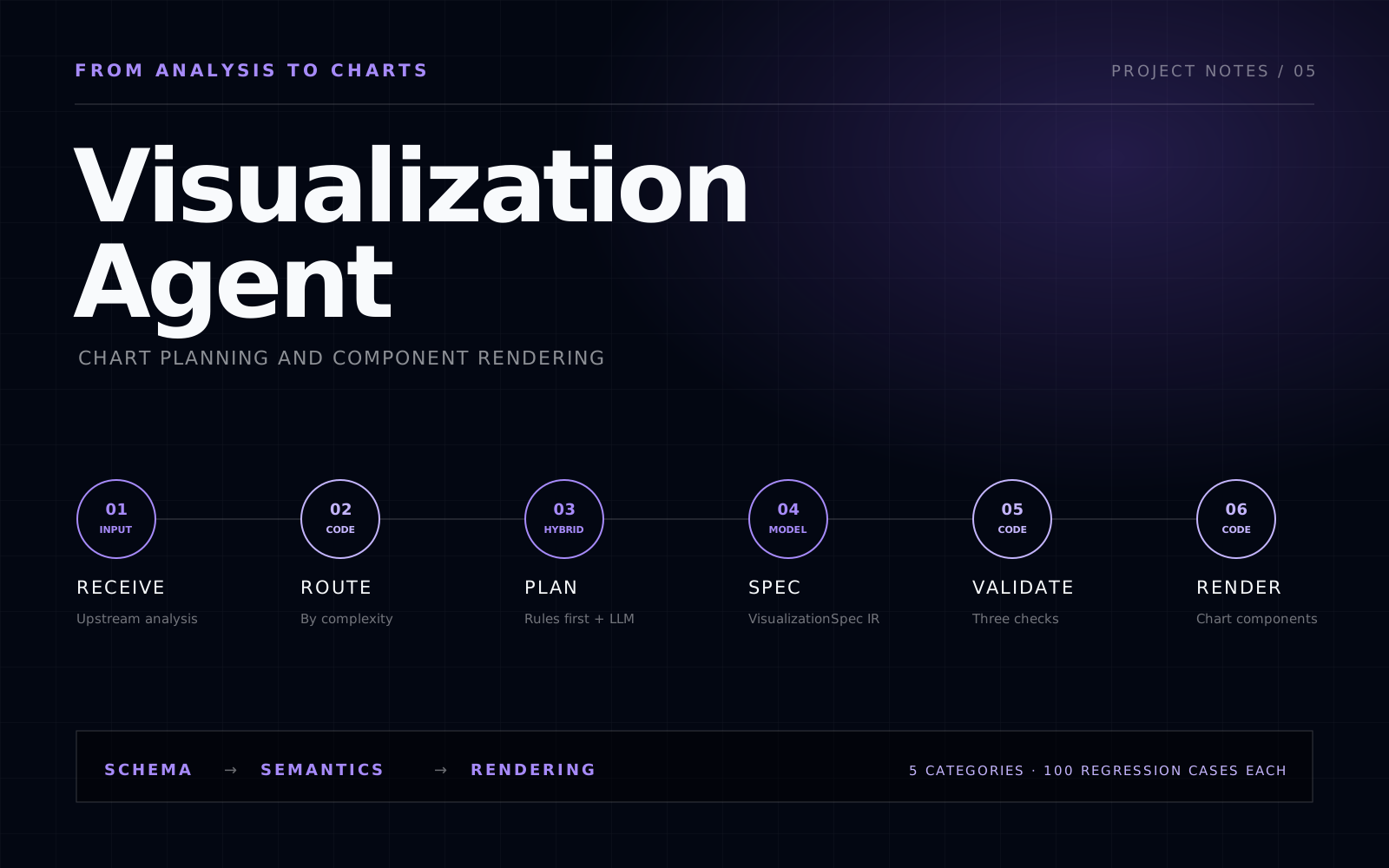
The routing, planning, validation, and rendering pipeline of the visualization agent
Architecture diagram, not an output image

A SMALL EXPLORATION

Same series. A different axis.

The most common misreading of a financial chart is not wrong data but the wrong axis. Long-run prices belong on a log scale, and drawdowns need marking, or readers remember only the final rally.

Illustrative data, not market prices or live component output. It only shows a design choice.
04008001200160020052010201520202025

On a linear axis the late rally fills the chart and the 43% fall in 2007–2008 nearly disappears.

01 / Context

The problem

Upstream analysis can be vague, so the intended message needs to be clarified before choosing a chart. Generating HTML or chart code directly can also produce data errors, incomplete structure, and inconsistent styling, even with the same input.

What we built

The model now produces a VisualizationSpec in a shared format. Code checks its structure, meaning, and rendering before generating the page. The project also includes visualization rules, common mistakes, and five categories of 100 regression cases each. Planned work includes better request interpretation, task decomposition, and model selection, with performance and reliability improvements informed by usage records.

02 / System

How the system works

  1. 01

    Choose a processing path

    Tasks with established rules use those rules directly. Others go to the model for interpretation and planning, with up to two rounds of self-review and repair.

  2. 02

    Check the chart specification

    VisualizationSpec describes the data and chart configuration. Code checks the JSON Schema, semantics, and rendering requirements in order, stopping and recording the reason if a check fails.

  3. 03

    Design guidance and regression cases

    The knowledge base holds chart patterns, financial rules, and common mistakes. Five categories of 100 cases each help check the effect of code changes.

03 / Decisions

Design choices

01

Describe charts with a specification

The model produces a VisualizationSpec for existing components to render. This limits some layout freedom, but makes the data and configuration easier to inspect and debug.

02

Stop when repair fails

If checks still fail after two repair rounds, return an error and keep the run record for investigation.

04 / Our work

Our role

Role:We defined the requirements, architecture, and technical design, documenting interfaces and design choices in more than 40 documents.

  • 01Defined the requirements, designed the processing flow, and planned implementation stages
  • 02Designed the VisualizationSpec, three validation stages, component registration, and run records
  • 03Built the visualization knowledge base, five test datasets, and regression checks
AI AgentStructured OutputQuality GatesDeterministic RenderingBenchmark